Trips is my solution for travel planning. Turning scattered ideas and saved points of interest into a structured travel planning experience. It helps users optimize their time, organize destinations logically, and plan entire trips seamlessly within the Google Travel ecosystem.
My initial research showed that travelers often struggle with managing information across multiple tabs, websites, and apps during the trip planning process. While many people already rely on tools like Google Maps, Docs, and Sheets, these products are not specifically designed to work together as a cohesive trip planning workflow.
I also discovered that Google previously offered a dedicated travel planning product, Google Trips, which was later discontinued and partially integrated into Google Travel in 2019 due to a lack of market demand. However, several key features that users valued (or felt were missing ) are still not available today. With advancements in AI optimization, these needs can now be addressed more effectively.
After identifying a renewed market opportunity and recognizing Google’s existing footprint in the travel space, I chose to focus this case study on reimagining the Google Trips experience. My goal was to modernize and improve Google Trips by addressing key user pain points while leveraging Google’s existing travel products and infrastructure.
The design focuses on creating a centralized planning experience that combines mapping, scheduling, saved locations, and collaborative organization into a single intuitive workflow. I leveraged Google’s Material Design system to ensure the experience felt consistent, familiar, and seamlessly integrated within the broader Google ecosystem.


FINAL SOLUTION

From Pins To Perfectly Planned Trips.
Google Trips is a smart travel planning experience that transforms saved places into optimized, executable itineraries within the Google ecosystem. By combining maps, scheduling intelligence, and real-time adaptability, it helps travelers spend less time planning and more time getting excited about their trip.
Smart Itinerary Generation creates optimized day and multi-day itineraries based on travel time, distance, operating hours, and user preferences.
Interactive Map-Based Planning transforms saved points of interest in Google Maps into actionable trip plans.
Context-Aware Recommendations surfaces personalized points of interest along optimized routes based on the traveler’s interests, current location, available time, and time of day, while helping users visually identify open time gaps in their itinerary
Seamless Google Ecosystem Integration connects with Google Maps, Google Travel, and Google Calendar to keep travel plans centralized and synced across platforms.
From Pins To Perfectly Planned Trips
FINAL SOLUTION
.png)
Google Trips empowers travelers to seamlessly plan complete trips from any starting point—whether a destination, flight, hotel, or point of interest—bringing every part of the journey together in one intelligent, personalized itinerary. Transforming fragmented planning into a seamless travel experience.

CORE FEATURES
Smart Itinerary Generation
Creates optimized day and multi-day itineraries based on travel time, distance, operating hours, and user preferences.
Interactive Map-Based Planning
Transforms saved points of interest in Google Maps into actionable trip plans.


Context-Aware Recommendations
Surfaces personalized points of interest along optimized routes based on the traveler’s interests, current location, available time, and time of day, while helping users visually identify open time gaps in their itinerary
Google Ecosystem Integration
Connects with Google Maps, Google Travel, and Google Calendar to keep travel plans centralized and synced across platforms.
RESEARCH & DESIGN PROCESS
1 DISCOVERY
Conducted generative research on travel planning to understand common user pain points and the strategies travelers use to overcome planning frustrations.
Synthesized research findings through affinity mapping, identifying key themes, behavioral patterns, and areas of opportunity within the travel planning experience.
2 DEFINE THE PROBLEM
Narrowed the problem space into a clearly defined and actionable design challenge, focusing on the most impactful user needs and pain points uncovered during research.
Generated and evaluated multiple product opportunity areas to explore solution spaces and identify the most promising direction for the experience.
3 COMPETITIVE ANALYSIS
Conducted competitive research across travel planning platforms, assessing competitor experiences, design patterns, information architecture, workflows, and trip planning features. Identified unmet user needs, market opportunities, and potential differentiation strategies to inform product direction and experience design.
Developed a product opportunity matrix to evaluate the tradeoffs between implementation effort and potential user impact, using identified market gaps.
Reviewed features from past and current Google travel-related products to understand which experiences users valued most, as well as recurring pain points and unmet expectations that remained unresolved.
Defined the business opportunity to expand Google Maps, Travel and Calendar into a unified end-to-end trip planning experience with collaborative planning and intelligent itinerary optimization.
4 SET GOALS
Synthesized research insights, competitive findings, and opportunity areas into clear product and user experience goals, defined product requirements, and established measurable success metrics to guide design decisions and evaluate product outcomes
5 DEFINE REQUIREMENTS
Defined a set of Tier I (MVP) and Tier II product requirements to guide solution development, categorizing features by priority, user value, and implementation complexity to support phased product delivery.
6 CREATE UX ARTIFACTS
Developed a persona representing the target user base, synthesizing research insights into a realistic user profile that captured key behaviors, goals, motivations, and pain points.
Mapped the primary user flow for the product's core functionality, outlining the end-to-end experience and identifying critical touch points, decision points, and opportunities to reduce friction throughout the journey.
7 DESIGN SOLUTIONS
Designed solution concepts based on research findings, user requirements, and defined product goals, exploring multiple approaches to address key user pain points.
Continuously iterated on and refined design solutions to ensure alignment with defined MVP requirements, existing Google product ecosystems, and familiar interaction patterns and mental models.
Developed high-fidelity interface designs that translated strategic product decisions into a functional user experience, balancing user needs, business objectives, and technical feasibility.
RESEARCH &DESIGN PROCESS
DISCOVERY
Conducted generative research on travel planning to understand common user pain points and the strategies travelers use to overcome planning frustrations.
Synthesized research findings through affinity mapping, identifying key themes, behavioral patterns, and areas of opportunity within the travel planning experience.
DEFINE THE PROBLEM
Narrowed the problem space into a clearly defined and actionable design challenge, focusing on the most impactful user needs and pain points uncovered during research.
Generated and evaluated multiple product opportunity areas to explore solution spaces and identify the most promising direction for the experience.
COMPETITIVE ANALYSIS
Conducted competitive research across travel planning platforms, assessing competitor experiences, design patterns, information architecture, workflows, and trip planning features. Identified unmet user needs, market opportunities, and potential differentiation strategies to inform product direction and experience design.
Developed a product opportunity matrix to evaluate the tradeoffs between implementation effort and potential user impact, using identified market gaps.
Reviewed features from past and current Google travel-related products to understand which experiences users valued most, as well as recurring pain points and unmet expectations that remained unresolved.
SET GOALS
Translated research insights, competitive findings, and identified opportunity areas into a set of clear product and user experience goals.
DEFINE REQUIREMENTS
Defined a set of Tier I (MVP) and Tier II product requirements to guide solution development, categorizing features by priority, user value, and implementation complexity to support phased product delivery.
CREATE UX ARTIFACTS
Developed a persona representing the target user base, synthesizing research insights into a realistic user profile that captured key behaviors, goals, motivations, and pain points.
Mapped the primary user flow for the product's core functionality, outlining the end-to-end experience and identifying critical touch points, decision points, and opportunities to reduce friction throughout the journey.
DESIGN SOLUTIONS
Designed solution concepts based on research findings, user requirements, and defined product goals, exploring multiple approaches to address key user pain points.
Continuously iterated on and refined design solutions to ensure alignment with defined MVP requirements, existing Google product ecosystems, and familiar interaction patterns and mental models.
Developed high-fidelity interface designs that translated strategic product decisions into a functional user experience, balancing user needs, business objectives, and technical feasibility.
The following section provides a deep dive into the research process and methodology I used to arrive at the final solution. For background information on the research process described below, please refer to the home page.
For a detailed overview of the research process and methodology I used to arrive at the final solution, please refer to the desktop version of this site.
CORE FEATURES
1
Smart Itinerary Generation creates optimized day and multi-day itineraries based on travel time, distance, operating hours, and user preferences.
2
Interactive Map-Based Planning transforms saved points of interest in Google Maps into actionable trip plans.
3
Context Aware Recommendations surfaces personalized points of interest along optimized routes based on the traveler’s interests, current location, available time, and time of day, while helping users visually identify open time gaps in their itinerary
4
Seamless Google Ecosystem Integration connects with Google Maps, Google Travel, and Google Calendar to keep travel plans centralized and synced across platforms.
METHODOLOGY DEEP DIVE
1
DISCOVERY: As someone who loves to travel, I have always found the planning and decision making phase to be the most frustrating part of the experience. Questions like where to go, when to travel, what the weather will be like, and how to spend our time often felt overwhelming rather than exciting. Planning for two people was manageable, since we could alternate decisions and compromise easily. However, planning with a group of friends introduced an entirely new layer of complexity. Coordinating schedules, aligning budgets, and creating an itinerary that genuinely excites everyone became a challenge. There was always the underlying pressure to make the plan “worth it” for everyone, minimizing the risk of people dropping out and ensuring a shared, enjoyable experience. The process itself was equally fragmented. Planning often meant juggling hundreds of browser tabs, pulling inspiration from Instagram, YouTube, blogs, and google, with no cohesive way to organize it all. The result was typically a disjointed collection of notes scattered across documents, making it difficult to manage, share, or revisit. This led me to envision a better solution, one that could streamline the entire planning process. Ideally, it would allow me to organize research efficiently, manage budgets clearly, and enable travel companions to collaborate transparently without turning planning into a chore. From there, I set out to explore whether others shared these frustrations. I wanted to better understand the existing tools available, as well as uncover additional challenges travelers face when planning both individual and group trips.

Wanderlog excels at all in one trip planning and collaboration, but falls short in route optimization and transportation guidance. Its all in one interface can sometimes feel overwhelming to users.
PROS
CONS
1
Comprehensive trip planning in one place: You can manage itineraries, flights, hotels, POIs, notes, and maps all within a single workflow.
2
Strong collaboration and sharing features: Adding friends, splitting costs, and sharing guides makes group travel easier.
3
Good visualization and organization tools: Map layers, color coded pins, and day-by-day itineraries help users clearly see and organize plans.
1
Limited route Optimization: Route optimization is limited to pro subscribers and can not be done for multiple days at a time 34.
2
Limited scheduling visibility and guidance: There’s no way to see time gaps within a day, get recommended time allocations for locations, or view plans in a calendar format 34.
3
Gaps in Personal expense tracking detail: No clear way to view individual or subgroup spending breakdowns.

I wanted to understand....
-
What people find stressful about trip planning?
-
What frustrates people during the trip planning process?
-
The order in which people typically plan their trips?
-
What steps people take to research and plan trips?
-
What tips, strategies, or resources people use to feel less stressed or overwhelmed while planning trips?
-
What tools people use to plan their trips?
I spent some time conducting online research to address these questions. Below are my summarized findings and the problems I identified.
Information Overload Leads to Decision Paralysis and cognitive fatigue
PROBLEM: Travelers struggle not only with the volume of information, but with filtering and interpreting content that varies in relevance, audience, and quality. Determining what actually applies to their trip requires continuous effort, leading to mental fatigue from constant decision making and context switching.
Travel Planning Is Inherently Inefficient Due Do The Absence Of Unified Workflows
PROBLEM: Travelers must manually build and maintain their own planning system across multiple tools, rather than working within a unified, purpose-built workflow. This fragmented approach increases time investment and creates friction, making planning feel like work instead of a positive part of the travel experience.
Travel Tool Fragmentation Forces Users Into The Role Of System Integrators
PROBLEM: Planning takes place across disconnected tools, forcing travelers to act as system integrators. They must manually aggregate information from maps, documents, spreadsheets, bookings, and research into a cohesive plan, with little to no interoperability between tools.
Building An Itinerary Is A Complex Routing And Optimization Challenge
PROBLEM: Travelers struggle to create logical itineraries because doing so requires simultaneously considering geography, time, logistics, availability, and personal priorities. This complexity makes it difficult to confidently organize activities into an efficient and realistic plan
Group Travel Planning Creates An Unequal Burden And Coordination Challenges
PROBLEM: Group planning often breaks down due to misaligned preferences, uneven participation, and a lack of structured decision making. As a result, one person typically assumes most of the coordination work, including managing schedules and balancing budgets, leading to delays and frustration.
DIY planning systems work but do not scale with complexity
PROBLEM: General purpose tools like Google Docs and Maps enable flexible planning, but they do not scale effectively as trips become more complex. Maintaining and updating plans requires increasing manual effort, making coordination and organization progressively harder.
After the initial discovery phase, the next step was defining the problem I wanted to solve.
2
DEFINING THE PROBLEM: Travel planning is not limited by a lack of inspiration, but by the difficulty of turning scattered ideas into a structured, realistic plan. Travelers struggle to convert fragmented research and inspiration into clear, optimized itineraries without incurring significant time investment, cognitive effort, and coordination friction, particularly in group contexts. Current planning workflows are non-linear, requiring users to move repeatedly between planning stages. This becomes even more complex in group settings, where coordination and alignment are required. Constant context switching increases cognitive load and disrupts decision continuity. At the same time, an overabundance of options, amplified by social media, increases anxiety around missing out. Despite travelers following a generally consistent workflow, typically moving from destination selection to activity research, then flight booking, and finally itinerary creation11, there is no unified solution that effectively supports and streamlines this end-to-end process.
From this point, I identified a set of product opportunities to address these challenges.
PRODUCT OPPORTUNITIES
A
Auto-generated personalized itineraries and pre-built travel templates.
B
Smart scheduling and route optimization with travel time prediction, time-aware planning, and logical sequencing.
C
A centralized planning hub for link aggregation.
D
Map and itinerary syncing with cross-platform integration.
E
Voting workflows for group decision-making, including preference ranking and consensus tools.
F
A gamified planning workflow system that tracks milestones such as budgets, bookings, and activities.
G
An itinerary comparison dashboard to evaluate budget, time, routing, and overall experience quality.
At this stage, it was important to identify any products offering an existing solution.
3
COMPETITIVE ANALYSIS: Based on the discovery research, the most commonly mentioned travel apps were Wanderlog, TripIt, and TripsTogether. I decided to investigate these tools, along with the popular research and inspiration platform, Tripadvisor, and the widely used core planning tool, Google Travel. Research note: In a more thorough competitive review, additional tools and platforms would be explored.
COMPETITOR SUMMARIES
The pros and cons were based on consumer insights gathered during discovery.
Wanderlog
Tripit
TripsTogether
Tripadvisor
Google Travel
Wanderlog
Tripit
TripsTogether
Tripadvisor
Google Travel

TripIt is a reliable tool for automatically organizing travel plans and keeping itineraries synced and shareable, but it lacks robust planning and discovery features and often requires manual input for customization.
1
Automatic itinerary creation: TripIt compiles travel details from confirmation emails into a single, organized itinerary.
2
Sync plans to your calendar: Easy calendar sync.
3
Reliable access and alerts: Works offline and provides helpful notifications for updates and travel changes.
1
Limited discovery and planning tools: You can’t search for or add new activities or POIs directly within the app.
2
Manual effort for custom entries: Adding activities requires detailed manual input.
3
Inconsistent email parsing: Some emails or languages aren’t fully supported, requiring manual corrections.

Trips Together streamlines group travel planning by replacing chaotic group chats with a single app where users can collaborate, vote on decisions, build itineraries, and manage expenses in one place.
PROS
CONS
1
Built for group decision making: Provides voting on destinations and activities enabling everyone to have a voice
2
Open collaboration on itineraries: Anyone in the group can add and edit itinerary items, making planning more inclusive and dynamic.
3
Transparent expense tracking: Real time cost splitting and settlement helps avoid confusion and tension around money.
1
Limited booking integration: Lacks fully developed, seamless booking capabilities within the app.
2
New platform with a limited user base: Early users have reported bugs, including display issues and stretched images 16.
3
Requires full group adoption: The experience works best if everyone uses the app, which can be a barrier for some groups.

Tripadvisor is an all-in-one travel platform that helps users discover destinations, plan trips with AI-powered recommendations, and book activities, hotels, and restaurants, though its itinerary management and navigation features can feel somewhat fragmented.
PROS
CONS
1
Comprehensive discovery tools: Covers destinations, activities, hotels, restaurants, and cruises in one place with rich details (reviews, photos, tips).
2
Strong AI assistance: AI helps with recommendations, map-based suggestions, and building a full itinerary based on user preferences.
3
Flexible filtering and booking: Robust filters (price, time, accessibility, etc.) and the ability to book activities, hotels, and restaurants directly.
1
Clunky itinerary management: Difficult to reorder items, and adding activities requires separate searching and saving steps.
2
Limited map and navigation features: Not all results are visible on the map, and there’s no travel time or transportation guidance.
3
Usability inconsistencies: Some workflows (like saving to specific days or exploring POIs) feel fragmented and less intuitive.

Travel
Google Travel is a powerful travel discovery and planning tool that excels at searching and comparing flights, hotels, and destinations, but lacks strong itinerary organization and seamless in-platform navigation.
PROS
CONS
1
Powerful search and flexibility: Excellent for exploring destinations, comparing flights, and using flexible date and map tools to find the best options quickly.
2
Strong price insights and tracking: Shows whether prices are low, typical, or high and allows users to track changes over time, helping avoid overpaying.
3
All in one ecosystem integration: Seamlessly connects with Google services (Maps, Search, Gmail) for itineraries, saved places, and personalized recommendations.
1
Lack of unified itinerary planning: Saved places, hotels, and flights are not integrated into a single, day-by-day itinerary.
2
Weak organization and visualization tools: It’s difficult to structure saved items into a clear schedule, and there is no strong timeline view (e.g., morning, afternoon, evening planning).
3
Limited navigation and routing support: There is limited ability to optimize routes or view travel time between saved locations, despite this being a core functionality in Google Maps.
Overall, Wanderlog stands out for its all in one planning and visualization tools, while TripIt excels in automation and organization. TripsTogether emphasizes collaborative decision making, though it is still maturing as a platform with limited booking integration. Tripadvisor and Google Travel dominate in discovery, search, and booking, offering rich data and AI support, but both fall short in seamless itinerary organization and navigation. Overall, no single product fully combines robust discovery, structured itinerary management, real time navigation, and collaborative planning into one cohesive experience.
After evaluating existing solutions, I revisited the product opportunities to assess which ones offered the strongest opportunity for a new solution.
PRODUCT OPPORTUNITY MATRIX
Low Effort
F
C
E
High Impact
A
Low Impact
D
G
High Effort
B
F, a gamified planning workflow, could help keep travelers engaged throughout the planning process, but it did not address core organization or itinerary planning issues.
C offered a centralized planning hub for all user links, both confirmed and still in the research phase. While this was a feature tripit did not have, it was fundamentally similar to TripIt’s core functionality.
A could be built with the help of AI to develop personalized itineraries that offer immediate value to travelers. However, I was skeptical about user adoption, particularly due to potential concerns around the source and use of personalization data. Additionally, general trip templates were already available in Wanderlog.
E, a voting workflow for group travelers, was a differentiator compared to most travel apps (aside from TripsTogether), but it was more niche and primarily benefited group travel scenarios.
G addressed decision fatigue by enabling comparison of multiple itineraries, but it was secondary to developing a strong, effective itinerary-building experience.
B & D Offered a high payoff, as they solved the biggest pain points of itinerary organization and routing. They also provided a more connected ecosystem across maps and planning.
At this point, it became clear that a digital product aligned with product opportunities B and D was the most promising path forward. The existing products analyzed did a decent job with discovery, but they broke down when it came to time based itinerary planning and routing. I decided to focus my solution on a multi day scheduler that could support realistic time allocation, route optimization, and seamless syncing between itinerary and map views. I wanted to build a solution centered on the “plan → optimize → improve” itinerary workflow.
Given the high frequency with which users rely on Google Travel and Maps for core planning activities, such as research, booking flights, and finding hotels, I chose to leverage this existing ecosystem rather than redesign features that Google already executes effectively. This approach also supported adoption, as users are already familiar with and actively using these platforms in their travel planning processes. As I moved forward, however, I discovered that Google previously offered a dedicated trip planning app named Google Trips (2016–2019), which addressed several of the challenges I aimed to solve. In the next section, I explored why the app was discontinued and examined how its removal impacted travelers who had come to rely on it.
GOOGLE TRIPS APP: 2016-2019
PURPOSE 24:
-
To assist users in organizing their trips and marking places they wanted to visit and things they wanted to do.
-
To allow users to create day plans by choosing from popular attractions or selecting their own 18.
-
To connect to users’ gmail accounts to pull information on hotel reservations and flights and add them to the app trip plan much like Tripit.
-
To work offline in cases of no wifi or international data plan
CAUSE OF FAILURE 24:
-
Google decided there was no longer a market need for Trips.
REPLACEMENT:
-
In 2019 Many of the apps features were added to google maps and google search but were disjointed 19.
-
-
In 2023 google decided to discontinue the trip summary feature that aggregated reservations from emails due to the small usage and confusing UI 25. Google decided reservations would just appear on google calendar as long as smart features and personalizations are on. 23
-
-
Users search data remained saved as long as they were signed into their google accounts

Trips Interface Examples I,18
Discontinued Features That Negatively Impacted User Satisfaction:
Automatic Trip Organization From Gmail:
-
Impact: Users need to manually aggregate their trip confirmation emails and reservations on their own to keep track of their itineraries. This introduces friction and the increased risk of misplacing important information.
“There is no auto-initiated Trip Summary… I will miss this convenience.” 29
Centralized Trips:
-
Impact: Trip information is now fragmented across emails, maps, and documents, making it harder to access key details quickly.
“I could quickly pull up details about where my hotels or airbnbs are, what dates I'm going, what time my flight is” 29
Daily + Multi Day Itinerary Planning:
-
Impact: Users can no longer easily structure trips into day by day plans or generate optimized multi-day itineraries making trip planning more time consuming and less effective.
“It created the most efficient sightseeing plan based distance, travel time and working hours. if you select more points to see than can be seen in a single day, it created a multi day trip for you.” 21
Integrated Discovery → Map → Itinerary Flow:
-
Impact: Users can no longer view all planned locations for a day in a single map to understand their proximity to one another making it harder to plan efficient day trips and understand geographic relationships.
“I’d browse and collect local attractions… see them on a map and plan out day trips” 20
Offline Access To Travel Information:
-
Impact: Instead of having trip information readily available offline, users must now take extra steps (e.g., pre-downloading maps), increasing the risk of being unprepared during travel.
“The biggest value add was downloading places offline… without having service” 21
Seamless, all-in-one experience:
Impact:
-
Travel planning is now fragmented across multiple tools, making it harder to stay organized and maintain a clear overview of trips.
“Theres no way to tie it together like trips did” 20
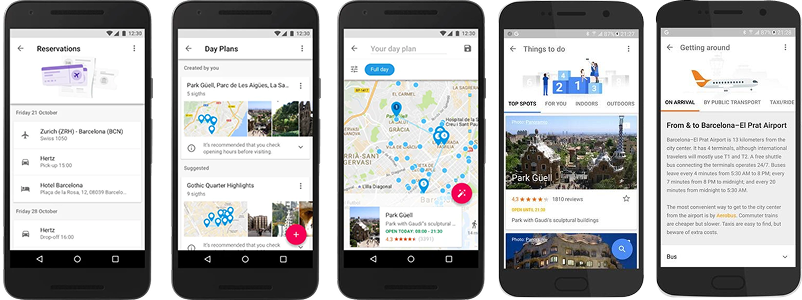
Trips Interface Examples II,18,22
With the loss of features, users have turned to workarounds within other Google tools, but these solutions still have usability issues that Google has not addressed.
WORKAROUND
ISSUE
Users create their own list of saved places within google maps to organize their POIs. 30
Lists has limited categorization & prioritization, and has no way to generate an itinerary for the saved POIs. 32
Users create custom maps with layers to differentiate different types of lists for a trip, ie. restaurants, hotels, activities etc. 31
There is a limit on how many layers you can create in a custom map limiting detailed planning. 31
Users color coordinate their different types of lists. 32
There is a limit of 4 color options which reduces visual organization making it difficult to distinguish pins between lists. 32
Users store many places in a single map or list. 32
Maps become cluttered with no clear prioritization. 32
Users add notes to saved places to indicate priority or context. 32
Notes are not structured, scannable, or sortable. 32
Users switch between multiple apps (e.g., maps and travel tools) to explore and plan trips.
Lack of integration causes fragmented planning.
Users manually piece together travel routes (bus/train/etc.) outside of their itinerary.
There is no option to plan optimized transportation between saved list POIs.
Users save places but mentally or manually organize them into a schedule with google docs or sheets.
There is no seamless way to convert saved places into structured daily itineraries.
Users share lists or maps with others for coordination
There is no list collaboration to conduct group planning
Users search externally for travel tips (e.g., airport navigation, transit advice).
Context-aware, timely travel guidance is not embedded within the planning experience.
This research demonstrates that, despite the discontinuation and redistribution of Google Trips app features, users still desire a number of capabilities that were either missing in the original product or lost over time. Many of these unmet needs align closely with the market gap identified during initial product discovery. At the same time, the original Google Trips experience was not without its shortcomings. For example, users had limited control when editing auto generated itineraries, which reduced flexibility and personalization 21. Additionally, some users expressed privacy concerns around automatic trip organization powered by Gmail integration 21.
DEFINING THE BUSINESS OPPORTUNITY
These findings highlighted a continued opportunity for Google to deliver a more comprehensive end-to-end travel planning experience within its existing ecosystem. By extending Google Maps and Google Travel with collaborative planning and itinerary optimization capabilities, Google could keep users engaged throughout the entire travel planning journey while increasing repeat usage across its travel products. This approach also creates future opportunities for travel bookings, local recommendations, and other ecosystem services. Based on these insights, I concluded that the strongest product opportunity was to extend Google Maps and Google Travel with collaborative planning and itinerary optimization capabilities that build on the strengths of Google Trips while addressing the limitations of both the original product and current Google Travel offerings.
4
SET GOALS: Using the above insights and identified product opportunities, I established clear product goals and prioritized feature requirements grounded in core user needs. These later served as the foundation for designing the initial solution and guiding iterative concept development.
Goal 1:
Enable Effortless End to End Trip Planning —Unify the trip planning journey by enabling users to start from any travel entry point—destinations, points of interest, flights, or hotels—and seamlessly progress to a complete itinerary in a single connected experience.
Goal 2:
Deliver Intelligent, Adaptive Itinerary Optimization — Leverage smart scheduling, travel time prediction, and real world constraints to generate optimized day and multi-day itineraries, while enabling flexible user customization and control.
Goal 3:
Make Maps Actionable, Not Just Visual— Transform saved places and lists in Maps into structured, executable plans by syncing them directly with itineraries, routes, and daily schedules. The map should become the interface for decision-making, not just storage.
Goal 4:
Integrate Seamlessly Within the Google Ecosystem —Build on existing Google tools (Maps, Travel, Calendar) to create a connected, cross platform experience. The product should enhance, not duplicate, existing workflows, enabling users to access and manage their trips wherever they already are.
PRODUCT REQUIREMENTS
Product requirements were prioritized based on user discovery and research insights. Tier I requirements were identified as essential for a minimum viable product (MVP), addressing the highest-priority user needs while establishing the core value proposition of collaborative trip planning and itinerary optimization. These capabilities build on the existing foundations of Google Maps, Travel, & Calendar requiring relatively minimal changes and investment to deliver the initial product experience. Tier II requirements provide additional functionality and differentiation but are intended for a subsequent release after validating the core experience and user adoption.
TIER I - MVP
Core Trip Planning
1
USER NEED: As user, I want one place to see all my upcoming trips.
PRODUCT REQUIREMENT: The system shall provide a centralized dashboard for viewing and managing all trips.
2
USER NEED:As a user, I want to be able to create a library of places I want to visit for a given trip.
PRODUCT REQUIREMENT: The system shall allow users to save, organize, and manage a personalized list of places they want to visit for their trip. [ Google APIs that can be leveraged: Places API ]
3
USER NEED: As a user, I want to be able to group multiple places or attractions and create a day plan with them.
PRODUCT REQUIREMENT: The system shall allow users to group multiple saved locations into a single itinerary and structure them into a day plan.
4
USER NEED:As a user, I want to be able to assign specific places to specific days and times.
PRODUCT REQUIREMENT: The system shall allow users to assign locations to specific dates and times within an itinerary.
5
USER NEED:As a user, I want to be able to edit and customize a generated itinerary plan.
PRODUCT REQUIREMENT: The system shall allow users to modify, reorder, add, or remove activities within generated itineraries.
Map + Itinerary Core Experience
6
USER NEED: As a user, I want to be able to create a custom map for each of my trips.
PRODUCT REQUIREMENT: The system shall allow users to generate and customize maps that display selected locations associated with a specific trip.
7
USER NEED:As a user, I want to have real-time sync between my itinerary and map view that highlights routes and travel paths and dynamically updates as I edit my plans.
PRODUCT REQUIREMENT: The system shall provide real-time, bidirectional synchronization between itinerary and map views, including dynamic route visualization and automatic updates when changes are made.
Basic Smart Planning
8
USER NEED: As a user, I want the system to generate the most efficient itinerary based on distance, travel time, traffic, operating hours, wait times, and activity duration.
PRODUCT REQUIREMENT: The system shall optimize itineraries by sequencing activities based on distance, travel time, traffic conditions, estimated duration, and hours of operation. [ Google APIs that can be leveraged: Routes API, Route Optimization API ]
9
USER NEED:As a user, I want to choose a starting point for my day plan.
PRODUCT REQUIREMENT: The system shall allow users to define a starting location for a day plan and use it as the anchor for itinerary optimization.
10
USER NEED:As a user, I want to be able to specify the number of days for my itinerary.
PRODUCT REQUIREMENT: The system shall allow users to define the duration of a trip and generate itineraries that fit within the specified number of days.
Transportation Basics
11
USER NEED:As a user, I want my day plans to include transportation options (bus, train, bike, etc.).
PRODUCT REQUIREMENT: The system shall provide integrated multimodal transportation options and routing information within day plans, including estimated travel times between locations.
Scheduling Essentials
12
USER NEED:As a user, I want arrival and departure times for each place.
PRODUCT REQUIREMENT: The system shall calculate and display estimated arrival and departure times.
Basic Organization
13
USER NEED:As a user, I want to filter my saved lists by restaurants, hotels, activities, day plans, etc. so I can quickly find relevant options based on my preferences and trip needs.
PRODUCT REQUIREMENT: The system shall allow users to apply filters across saved lists (e.g., restaurants, hotels, activities, and day plans)
Core Integration
14
USER NEED:As a user, I want integration with Google Maps, Google Travel, and Calendar.
PRODUCT REQUIREMENT: The system shall integrate with Google Maps (saved places), Google Travel (bookings), and Google Calendar (events). [ Google APIs that can be leveraged: Maps URL ]
Privacy
15
USER NEED:As a user, I do not want the product to read my emails to plan my itinerary.
PRODUCT REQUIREMENT: The system shall require explicit user consent before accessing or processing email data for itinerary creation.
SUCCESS METRICS
Once the product goals and requirements were established, I defined a set of success metrics to evaluate the effectiveness of the solution. To measure different aspects of product success, I identified six key metric categories outlined below. The examples represent a subset of metrics that could be used to evaluate user adoption, satisfaction, and overall product effectiveness.
ADOPTION
Feature Adoption Rate - % of users who engage with the itinerary planning feature for more than 5 minutes.
Day 7 & Day 30 Retention - % of users who return to continue planning or create another trip.
PLANNING & OPTIMIZATION SUCCESS
Optimization Acceptance Rate - % of optimized itineraries accepted without manual edits.
Re-Optimization Rate - % of itineraries optimized more than 3 times.
POI Completion Rate - % of desired destinations successfully incorporated into the itinerary.
Time Saved Through Optimization - Average reduction in travel time compared to the user's original itinerary.
ACTIVE USAGE DURING TRAVEL
Itinerary Adherence Rate - % of planned activities completed.
Mid-Trip Replanning Rate - % of users who modify the itinerary during travel.
EFFICIENCY & PRODUCTION
Task Completion Rate - % of users who successfully complete planning without abandoning the flow.
Time To First Itinerary- Time required to build an initial itinerary.
Planning Abandonment Rate - % of users who begin but never finish an itinerary.
ECOSYSTEM INTEGRATION
POI-To-Trip Conversion Rate -% of Google Maps saved place lists that become an itinerary.
Calendar Sync Rate -% of itineraries synced with Google Calendar.
USER SATISFACTION
System Usability Score (SUS)
Trip Satisfaction Score - Average likert scale response to: "Overall, I was satisfied with the trip I planned using Google Trips."
9
8
7
6
5
CONDUCTING RESEARCH & REPORT ON FINDINGS: At this stage, I would have reviewed the goals and requirements to identify areas where additional user support or validation was needed, and developed targeted research questions to test key assumptions and refine feature scope, especially regarding edge cases. It would also have been valuable to ask users to rate the importance of each proposed feature in order to prioritize them based on direct user input. In addition, I would have revisited competitor products and asked their users to indicate how frequently they used comparable features under consideration, helping distinguish between perceived value and actual behavior.
These steps were not included in this case study due to limited access to users.
10
CREAT UX ARTIFACTS: A persona was developed based on discovery insights, along with a high-level user flow that mapped the intended product experience to the defined requirements.
PERSONA
The research identified a distinct user: a highly motivated, detail oriented traveler who enjoys discovering places and planning trips but struggles with fragmented tools, manual effort, and translating ideas into a clear, optimized itinerary. They value control and customization, but want intelligent support that reduces effort rather than forcing them to manage every detail themselves.

USER FLOW
This flow represents the primary user journey a traveler follows when planning a trip within the Google ecosystem. Additional flows occur when users perform actions such as adding or removing destinations, updating their plans in real time, or collaborating with others. For the purpose of this case study, I focused on the high-level core flow. In a full product implementation, all supporting flows and edge cases would be mapped to ensure a seamless experience, with clearly defined triggers and system responses at each step.
This flow outlines how a user:
-
Creates a new trip (destination + dates)
-
Selects POIs or links saved places
-
Sees suggested popular attractions
-
Sets constraints for their plan
-
Generates an optimized plan
-
Reviews their itinerary
-
Edits their plan and re-optimizes it
-
Syncs it with their calendar

In addition to the core planning journey, product entry points would be integrated throughout the Google ecosystem to improve discoverability and adoption. Dedicated user flows would be designed for each entry point, including: (1) after booking a flight, prompting users to start an itinerary with travel dates prefilled; (2) after saving multiple points of interest in a destination, prompting users to organize them into an itinerary; (3) through a dedicated entry point within Google Travel; and (4) through Google Calendar when upcoming travel is detected
11
DESIGN SOLUTIONS: With the problem space and artifacts defined, I transitioned into solution design and iterative refinement. In a production environment, I would have partnered with engineering early to validate the feasibility of the concepts and to align on technical constraints.
WIREFRAMES
PR #
: Accompanying Product Requirement Number

DURING THE WIREFRAME PROCESS I ITERATED ON:
-
Creating multiple types of lists per trip vs one that can be filtered
-
Ways to add saved places for the trip to the itinerary
-
How to constrain an activity to a certain day/ time of day
-
How to best Integrate Google Calendar
12
13
TEST SOLUTIONS & ITERATE: Had users been available, I would have conducted a series of evaluative studies to test both individual features and the overall solution, including A/B testing and heuristic evaluation. I would then have iterated based on the findings until strong user and stakeholder alignment was achieved.
14
FINALIZE DESIGN: I completed a final design based on the research and findings above. In a subsequent phase, Tier II requirements would be added and the product would continue to evolve.
Scroll back to the top to check it out!
RAW RESEARCH DATA

TIER II REQUIREMENTS

REFERENCES


From Pins To Perfectly Planned Trips
